





Maintenance Checklist for Commercial LED Moving Head Light
- Why regular maintenance prolongs life and performance
- Daily and pre-event checks
- Visual and functional walk-through
- Safety & mounting inspection
- Quick optical check
- Weekly and monthly maintenance
- Cleaning: optics, fans, and heatsinks
- Electrical and connector checks
- Firmware and control verification
- Quarterly and annual deep maintenance
- Thermal system verification
- Mechanical & motion system service
- LED and optical performance assessment
- Spare parts, inventory & service logs
- Recommended spare parts
- Service log and failure tracking
- When to escalate to manufacturer service
- Troubleshooting quick-guide
- No power or intermittent power
- Reduced output or color shift
- Unresponsive to DMX/RDM
- Maintenance schedule table
- Safety, compliance & best practices
- Electrical safety
- Environmental considerations
- Documentation & training
- Quick decision matrix: repair vs replace
- Frequently Asked Questions (FAQ)
- 1. How often should I replace fans on LED moving head lights?
- 2. Can I use compressed air from a shop compressor to clean fixtures?
- 3. What are common causes of color shift in fixtures?
- 4. Is firmware updating safe during a performance season?
- 5. How do I track fixture hours and usage efficiently?
- Contact & product support
- References
Why regular maintenance prolongs life and performance
Commercial LED moving head lights are complex electromechanical devices combining high-power LEDs, precision optics, stepper/servo motors, and onboard electronics (drivers, fans, and control boards). Regular maintenance reduces failure rates, maintains light output and color fidelity, prevents safety incidents, and preserves return-on-investment for rental houses, theatres, clubs, and house-of-worship installations. This checklist is focused on practical, verifiable actions you can apply on-site, with recommended intervals, safety notes, and troubleshooting steps tailored to professional users who buy, service, or rent LED moving head lights.
Daily and pre-event checks
Visual and functional walk-through
Before each event or daily use: inspect fixtures for obvious damage (cracked housings, loose fasteners), check that safety cables and clamps are correctly installed, confirm that power and data cables are correctly routed and strain-relieved, and verify that fans run on power-up. Power the fixture and run a short self-test or show profile to confirm pan/tilt movement, lens/zoom operation, color wheels, gobos, and DMX control responsiveness.
Safety & mounting inspection
Verify rigging hardware (clamps, shackles, truss points) and safety chains/cables comply with local codes and manufacturer torque ratings. For touring rigs, check that flying points are secure and that fixtures are tagged with load test dates. Replace any worn clamps or safety cables immediately.
Quick optical check
Wipe external lenses and windows with a lint-free microfiber cloth and approved lens cleaner (see manufacturer lens-care recommendations). Avoid ammonia-based cleaners on polycarbonate or acrylic lenses. If beam output appears noticeably reduced, schedule a more detailed optical cleaning and inspection.
Weekly and monthly maintenance
Cleaning: optics, fans, and heatsinks
Dust accumulation is the most common cause of thermal and optical degradation. Weekly or monthly (depending on venue dust) cleaning steps:
- Power down and disconnect the fixture from mains.
- Use filtered compressed air (low-pressure, <30 psi) to remove dust from heatsinks, intake grills, and fans.
- Clean lenses and windows with a manufacturer-recommended optical cleaner and microfiber cloth.
- Remove grease or residue from gobos and color wheels carefully with isopropyl alcohol (70%) and lint-free swabs if recommended by the manual.
Electrical and connector checks
Inspect powerCON/NEUTRIK power connectors, DMX/XLR or RJ45 data connectors, and IEC inlets for bent pins, corrosion, or loose contacts. Tighten cable clamps and replace cables showing insulation damage. Verify power distribution devices provide stable voltage and that inrush protection is functional for fixtures with high start currents.
Firmware and control verification
Check manufacturer websites for firmware updates for the fixture's main board and any optional control modules. Before updating: back up current settings, confirm the update addresses specific issues, and apply updates during maintenance windows with stable power. Test DMX addressing, polarity, and RDM (if supported) after updates.
Quarterly and annual deep maintenance
Thermal system verification
Measure case and junction temperatures under normal operating conditions and compare to manufacturer-specified limits. Check that fans spin freely and bearings show no play or noise. Replace fans at first sign of grinding, excessive noise, or when RPM falls outside acceptable range. Verify heatsink mounting screws are secure and thermal interface materials (TIM) show no visible degradation if accessible and recommended by the manufacturer.
Mechanical & motion system service
Inspect pan/tilt gearboxes, belt drives, and encoders. Clean and lubricate mechanical joints only with greases specified in the service manual. Check limit switches and end-stop sensors; recalibrate motor home positions and test movement accuracy. Listen for slop, grinding, or missed steps during full-range movement; address motor drivers or gearbox wear as needed.
LED and optical performance assessment
Measure luminous flux and color point (CCT/CRI) where possible using a photometer or spectrometer. Track lumen depreciation over time and compare with expected LED lifetime curves (e.g., L70 predictions). Replace LED modules or emitter boards when light output or color drift exceeds acceptable thresholds for your production standards.
Spare parts, inventory & service logs
Recommended spare parts
Maintain a minimal service kit for each fixture model in your inventory. Typical spares:
- Fan assemblies (1–2 per 5 fixtures)
- Power input modules / fuses
- Lens windows and polycarbonate covers
- Motors or motor driver modules
- Commonly failing connectors and cable assemblies
Service log and failure tracking
Keep a digital service log per fixture (asset tag, installation date, hours operated, firmware revisions, repairs). Use that log to identify patterns (e.g., fan failures concentrated at certain humidity levels) and to support warranty claims with manufacturers or to justify preventive replacement schedules.
When to escalate to manufacturer service
If you encounter PCB-level failures, water ingress, or LED string failures beyond module replacement, contact the manufacturer or an authorized service center. Use RMA processes for warranty coverage and provide service logs and failure patterns to accelerate diagnosis.
Troubleshooting quick-guide
No power or intermittent power
Checklist: verify mains outlet and distro breaker, inspect power cable and connectors, check fuse or internal PSU modules, measure input voltage at IEC. Replace fuses with same spec only; do not bypass safety circuits.
Reduced output or color shift
Checklist: clean optics, measure LED temperature (overheat reduces output), compare firmware/color calibration, test individual LED channels if accessible. If lumen loss >15% or color point shifts out of tolerance, plan LED module replacement.
Unresponsive to DMX/RDM
Checklist: verify DMX cabling and termination, check address settings, test with known-good controller, update firmware, and test RDM discovery. For networked fixtures, verify IP settings and switch compatibility (use gigabit-managed switches rated for AV traffic).
Maintenance schedule table
| Interval | Tasks | Who |
|---|---|---|
| Daily / Pre-event | Visual inspection, safety cables, functional test, quick lens wipe | Stage tech / operator |
| Weekly–Monthly | Dust removal, fan check, connector inspection, firmware review | Technician |
| Quarterly | Thermal measurements, motor calibration, detailed optical cleaning | Service tech |
| Annual | Full teardown inspection, replace wear parts, photometric test | Authorized service / in-house senior technician |
Safety, compliance & best practices
Electrical safety
Always disconnect fixtures from mains before opening covers. Follow lockout/tagout procedures for in-house service. Ensure replacement parts match original safety ratings (insulation class, creepage, and clearance). For guidance on electrical safety in workplaces, refer to local authority and OSHA standards.
Environmental considerations
Protect fixtures from moisture and corrosive atmospheres. For coastal venues, increase cleaning frequency and opt for corrosion-resistant hardware. Dispose of failed LED modules and PCBs according to local e-waste regulations.
Documentation & training
Provide technicians with manufacturer service manuals, torque specs, and approved cleaning agents. Regularly train staff on mechanical handling, firmware updates, and DMX networking best practices to reduce accidental damage and downtime.
Quick decision matrix: repair vs replace
Use the following guideline when deciding whether to repair a fixture or replace it. Costs and expected remaining life should drive the decision.
| Condition | Repair? | Replace? |
|---|---|---|
| Single fan failure; otherwise good | Yes (low cost) | No |
| Multiple LED channel failures; >50% lumen loss | Maybe (if modular LED boards available) | Yes (if cost close to new) |
| Severe mechanical damage or water ingress | No (safety risk) | Yes |
Frequently Asked Questions (FAQ)
1. How often should I replace fans on LED moving head lights?
Replace fans when noise or RPM degradation is observed, or proactively every 18–36 months depending on hours of operation and environmental dust. Maintain spare fans in inventory to minimize downtime.
2. Can I use compressed air from a shop compressor to clean fixtures?
Yes if filtered and regulated. Use low pressure (<30 psi) and moisture traps. Avoid blasting optics at close range to prevent scratching. When possible, use canned filtered air designated for electronics.
3. What are common causes of color shift in fixtures?
Common causes include LED driver degradation, thermal stress to LEDs, optical contamination, or failed color channel electronics. Photometric testing helps isolate whether the issue is optical or electrical.
4. Is firmware updating safe during a performance season?
Only update firmware during controlled maintenance windows. Back up settings and ensure stable power during updates. Review change logs for fixes relevant to your fixtures.
5. How do I track fixture hours and usage efficiently?
Use the fixture's internal hours meter (if available) and keep a centralized asset management spreadsheet or CMMS system. Record hours per event and per rental to build lifecycle and maintenance schedules.
Contact & product support
If you need model-specific maintenance guides, spare parts, or on-site service for your LED moving head lights, contact our technical support team or browse our inventory of professional-grade fixtures and parts. For a service quote or to view products, visit our product page or contact support@example.com.
References
- Moving head (Wikipedia) — Accessed 2026-01-13
- Illuminating Engineering Society (IES) Standards, including TM-21 — Accessed 2026-01-13
- Elation Professional — Technical Support and Manuals — Accessed 2026-01-13
- Martin by HARMAN — Service Manuals and Support — Accessed 2026-01-13
- OSHA — Electrical: Safety and Health Topics — Accessed 2026-01-13
- Signify (Philips Lighting) — LED Thermal and Reliability Guidance — Accessed 2026-01-13
Warranty, Service Contracts and Spare Parts Strategies
LED Moving Head Spot vs Wash: Which Is Right for You?
Warranty and Support Checklist for Custom LED Lighting Suppliers
Energy-Saving Tips for LED Stage Lighting
Major categories
Do you ship internationally?
Yes. We offer sea, air, and express delivery to many countries and regions worldwide.
What is the usual lead time?
Standard models are typically shipped within 7–15 working days after payment. Customized items may vary.
What is the warranty period for your products?
Most products come with a standard 1–2 year warranty. Please refer to product details or contract terms for specifics.
Do your products support customization?
Yes. We offer OEM and ODM services tailored to project needs, including design, optics, and control compatibility.
Do you offer samples?
Samples are available for certain models. Please confirm with our sales team for details.
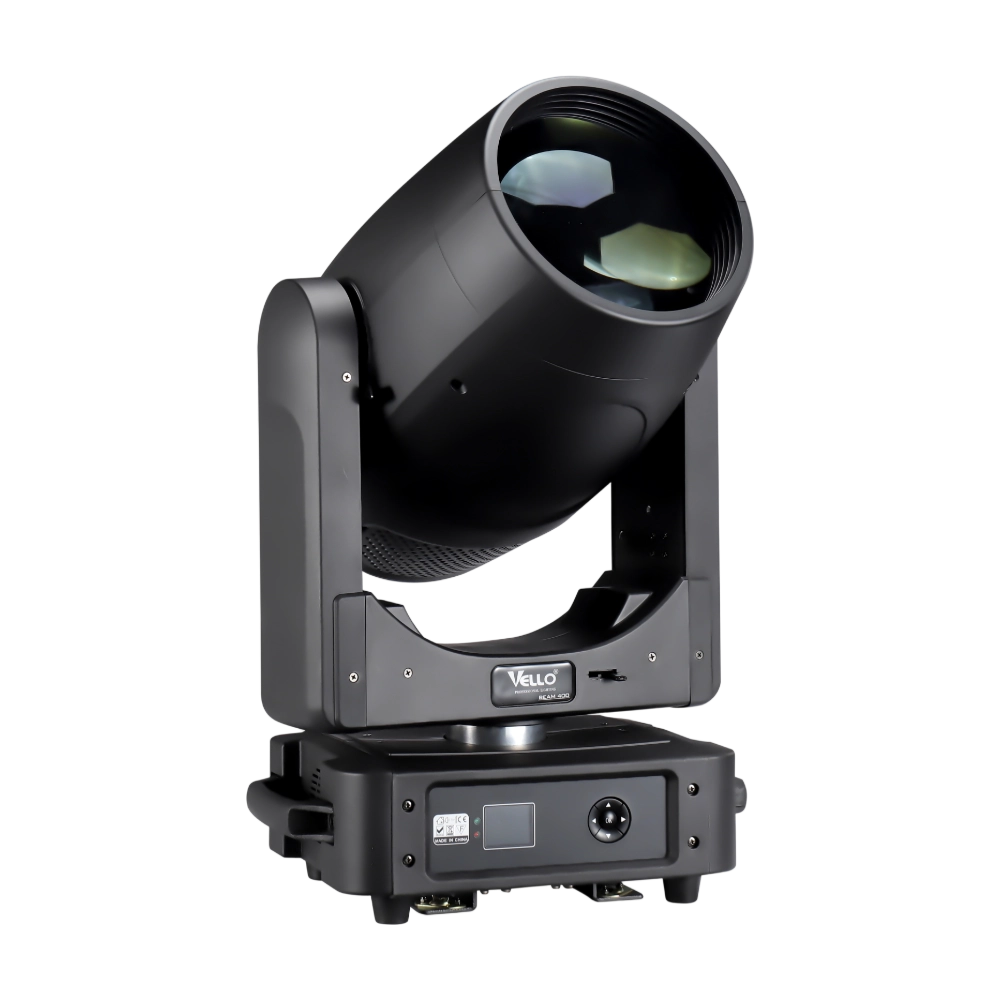
Moving Head Stage Light BEAM 400
BEAM400 is a 500W professional moving head beam powered by an OSRAM SIRIUS 371W discharge bulb, delivering a super-bright 1.8° sharp beam with impressive punch. It features 12 fixed gobos + open, a 14-color wheel, and a 16-facet circular rotating prism with multiple-facet effects, enabling dynamic aerial visuals. With 540° pan / 270° tilt, 16-bit movement resolution, and linear frost and focus, BEAM400 ensures precise and versatile performance. Comparable to traditional 750W moving heads, it combines high efficiency, smooth dimming, and reliable operation—ideal for concerts, tours, and large-scale stage productions.
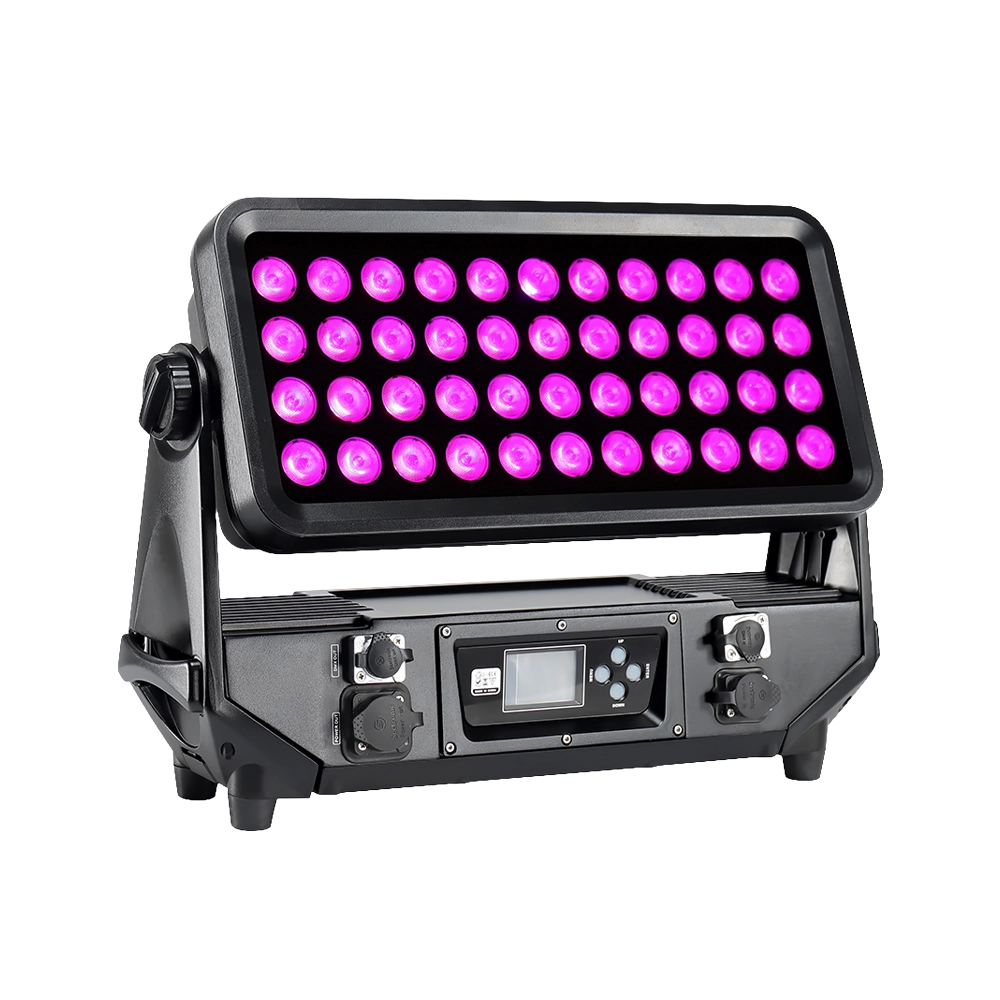
LED Light LED TOP P4
The Vello LED TOP P4 is a robust, high-output LED flood wash light designed for outdoor stages, architecture, and large-scale event lighting. Powered by 44x 15W RGBW LEDs from Cree, it delivers consistent brightness, smooth color mixing, and selectable beam angles of 20° or 40°. Built with a rugged IP65-rated die-cast aluminum housing, it withstands harsh weather conditions while offering smooth 0–100% dimming and flexible DMX control.
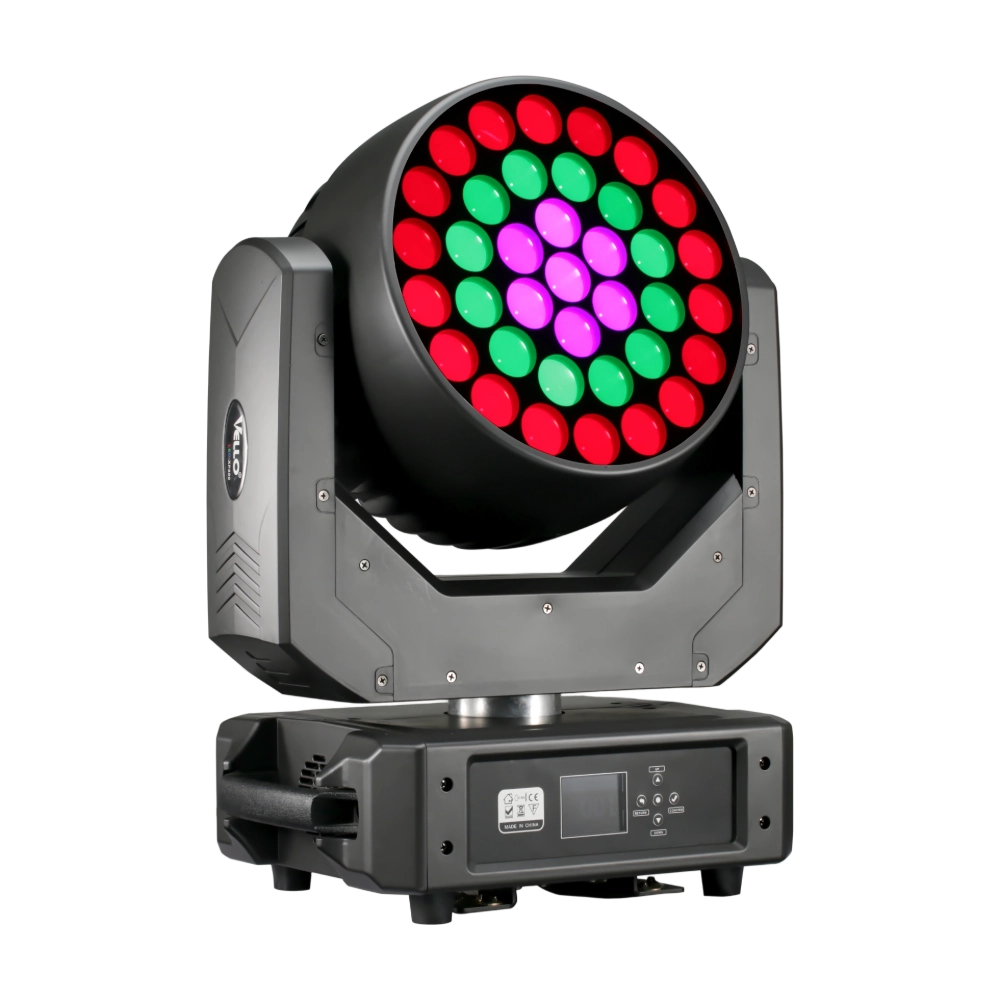
LED Moving Head Light XP800 (4in1)
The LED XP800 is a 600W moving head wash fixture, equipped with 37 × 20W Osram RGBW LEDs for brilliant color mixing and high output. With a wide 6°–50° electronic zoom, it easily transitions from sharp beams to smooth washes. The fixture supports 3-ring pixel control and an adjustable CTO range (2800K–8500K) for versatile applications. Featuring 540° pan / 310° tilt, high-speed 3-phase motors, and multiple DMX modes (16/28 channels), XP800 delivers powerful, precise, and dynamic performance. Compact and durable, it is an excellent choice for stages, theaters, and large-scale events requiring high brightness and flexibility.
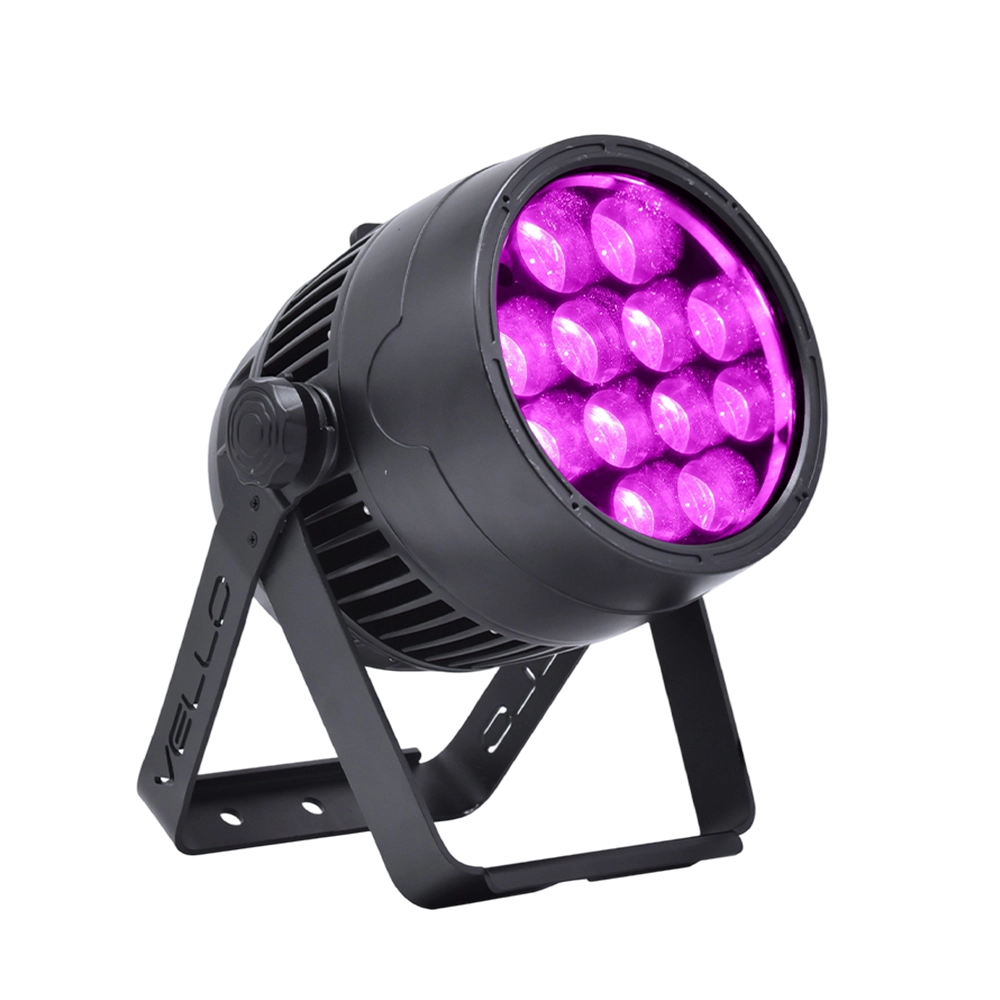
Stage LED Par Light LED ZOOMPAR 40
The Vello Zoom Par 40 IP is a powerful outdoor LED wash light equipped with 12x high-power 7-in-1 RGBACL LEDs. Designed for durability and rich color rendering, it features a wide motorized zoom (6°–50°), smooth dimming, and adjustable CTO presets (3200K–7500K), with 90+ CRI. With an IP66-rated die-cast aluminum body, it’s ideal for both indoor and outdoor applications, including stage lighting, architecture, live events, and installations.
Over 20 Years of Innovation in Stage & Studio Lighting
© 2026 VELLO. All Rights Reserved. 粤ICP备20023734号
Join our socials
VELLO
Whatsapp: +8613902276704
Vello Lighting
VelloLights