





DMX Basics: How to Control Your Stage Lights
- How DMX Makes Your Stage Lights Responsive
- What DMX is and why every stage light technician should know it
- DMX fundamentals: channels, universes, and addressing for stage light control
- How DMX channels and addresses map to fixture functions
- Common DMX hardware: consoles, interfaces, and the fixtures themselves
- Choosing control hardware for your stage light setup
- Wiring and signal integrity: cabling, termination, and reliability for stage light DMX
- Best practices to maintain reliable DMX signals
- Protocols beyond DMX: Art-Net and sACN for large-scale stage light systems
- When to use DMX over Ethernet for modern stage lighting
- Comparing control methods: consoles vs. software vs. simple controllers
- Choose the right control method for your stage light needs
- Common problems and troubleshooting tips for DMX and stage lights
- Practical checks to fix unresponsive or flickering stage light fixtures
- Programming tips: building reliable cues and using presets for fast operation
- How to structure cues for live performances with stage light fixtures
- RDM and two-way communication: smarter stage light management
- Use RDM to simplify addressing and monitoring of stage light fixtures
- Energy efficiency and LED stage light considerations
- Why LED fixtures affect how you design DMX shows
- When to consult a professional lighting designer or hire rental gear
- Matching system complexity to production needs for stage light projects
- Why choose professional-grade fixtures: reliability, serviceability, and performance
- Investing in durable stage light fixtures for consistent results
- VELLO Light: a reliable partner for professional DMX stage light systems
- How VELLO products and services support DMX-based stage light installations
- Quick-start checklist: setting up DMX control for your first show
- A practical 10-step guide to get your stage light system ready
- FAQ — Frequently Asked Questions about DMX and stage light control
- 1. What is the difference between DMX and Art-Net when controlling stage light fixtures?
- 2. How many stage light fixtures can I run on one DMX universe?
- 3. Can I mix LED stage lights and moving heads on the same DMX chain?
- 4. What causes flicker or strobing in LED stage lights under DMX control?
- 5. How do I assign DMX addresses quickly when deploying many stage light fixtures?
- 6. What safety considerations should I follow when installing stage lights?
- References
- Contact & Product Inquiry
How DMX Makes Your Stage Lights Responsive
What DMX is and why every stage light technician should know it
DMX512 (often shortened to DMX) is the industry standard digital protocol for controlling lighting fixtures and effects on stages, in studios, and at events. Originally developed in 1986 by the United States Institute for Theatre Technology (USITT), DMX provides a reliable, low-latency method to send control data to stage light fixtures such as moving heads, LED wash lights, LED Pars, and effect lights. Knowing DMX fundamentals lets you configure, troubleshoot, and expand lighting systems with confidence — whether you operate a small house-of-worship rig or a large touring production.
DMX fundamentals: channels, universes, and addressing for stage light control
How DMX channels and addresses map to fixture functions
A DMX universe carries up to 512 channels; each channel is one byte (0–255). A single stage light fixture uses one or multiple consecutive channels depending on its complexity. For example, a simple RGB LED Par may use 3 channels (R, G, B), while a moving head stage light with pan/tilt, color, gobo, and dimmer could use 16–30 channels or more.
Addressing means assigning a start channel (called the DMX address) on the universe so fixtures don't overlap. If Fixture A starts at address 1 and uses 10 channels, the next fixture should start at address 11 or higher. Correct addressing prevents unpredictable behavior and is a core competence for every lighting technician.
Common DMX hardware: consoles, interfaces, and the fixtures themselves
Choosing control hardware for your stage light setup
There are three broad categories of DMX controllers you will encounter:
- Dedicated hardware consoles (for live shows and touring)
- Software-based controllers (PC/Mac/iPad apps with USB/ethernet interfaces)
- Simple wall panels or inline controllers (for basic venue installs)
When selecting a solution, consider the number of stage light fixtures, complexity of cues, and whether you need remote control or networking (Art-Net/sACN). Hardware consoles excel in live tactile control; software solutions excel at visualization and complex programming with fewer upfront costs.
Wiring and signal integrity: cabling, termination, and reliability for stage light DMX
Best practices to maintain reliable DMX signals
Use proper DMX cabling (110-ohm shielded twisted pair) and wired daisy-chain topology. Avoid using microphone cable or unbalanced cable for permanent installs. The last fixture on a chain must have a DMX terminator (a 120-ohm resistor) to prevent signal reflections.
For longer runs or noisy electrical environments, consider DMX-over-Ethernet protocols (Art-Net or sACN) with Ethernet switches, or use DMX opto-isolators and signal amplifiers/repeaters. Keeping cable lengths within spec and maintaining good connectors reduces intermittent problems during shows.
Protocols beyond DMX: Art-Net and sACN for large-scale stage light systems
When to use DMX over Ethernet for modern stage lighting
DMX512 is perfect for up to a few universes and simpler setups. For large installations or distributed systems, Art-Net and sACN carry multiple DMX universes over standard Ethernet. Advantages include longer distances, easy distribution, and integration with networked lighting consoles. Many modern fixtures and consoles support Art-Net/sACN natively, allowing greater scalability for complex shows.
Comparing control methods: consoles vs. software vs. simple controllers
Choose the right control method for your stage light needs
The table below summarizes typical tradeoffs among control methods for stage light systems.
| Control Type | Best For | Pros | Cons |
|---|---|---|---|
| Hardware Console | Live shows, touring | Robust, tactile control, low latency | Higher cost, learning curve |
| Software + Interface | Theatrical programming, small-to-medium systems | Flexible, visualization, lower hardware cost | Dependent on computer stability, possible latency |
| Simple Wall/Inline Controller | Installations, basic scenes | Affordable, easy setup | Limited features, not suitable for complex cues |
Common problems and troubleshooting tips for DMX and stage lights
Practical checks to fix unresponsive or flickering stage light fixtures
When a stage light behaves oddly, run this checklist:
- Verify power to the fixture and proper voltage.
- Check DMX cabling and connectors (look for broken pins, loose screws).
- Confirm DMX address and channel footprint in the fixture manual.
- Ensure termination is installed at chain end.
- Isolate fixtures — swap with a known-good unit to determine if the problem follows the fixture or the cable/port.
- For networked systems, verify IP settings and universe mapping (Art-Net/sACN).
These practical steps solve 80%+ of field issues without specialized tools.
Programming tips: building reliable cues and using presets for fast operation
How to structure cues for live performances with stage light fixtures
Organize cues into palettes or presets (color, position, gobo, beam) and use submasters or faders for real-time control. Pre-program scenes for predictable transitions and keep a separate safe or blackout cue for quick emergencies. When working with moving head stage light fixtures, use look and zoom presets to recall complex positions quickly. Always test cues in the venue at performance intensity to ensure visuals translate from rehearsal to show.
RDM and two-way communication: smarter stage light management
Use RDM to simplify addressing and monitoring of stage light fixtures
Remote Device Management (RDM) extends DMX with bidirectional communication, letting controllers query fixture status, set addresses remotely, and read sensor data like temperature. RDM greatly reduces setup time and helps diagnose issues without climbing ladders to check fixture displays. Enable RDM when possible, but ensure your console and fixtures both support it.
Energy efficiency and LED stage light considerations
Why LED fixtures affect how you design DMX shows
LED-based stage light fixtures have different dimming curves and color-mixing behavior compared to discharge-lamp fixtures. LEDs are more energy-efficient, produce less heat, and require different calibration for smooth fades and color accuracy. When programming, use calibrated color macros or calibration tools in your console to ensure reliable color reproduction across LED fixtures.
When to consult a professional lighting designer or hire rental gear
Matching system complexity to production needs for stage light projects
Smaller worship venues and clubs can often be served by a single operator with a modest console and a few LED stage lights. Larger events, complex shows, or installations with architectural integration benefit from a lighting designer and a professional rental house that can supply higher-channel consoles, network distribution (Art-Net/sACN), and experienced technicians to program and run the show. Budget for rehearsals and system testing; last-minute changes on show day are an expensive risk.
Why choose professional-grade fixtures: reliability, serviceability, and performance
Investing in durable stage light fixtures for consistent results
Professional fixtures often use higher-quality optics, motors, and electronics with serviceable parts and firmware support. This yields more reliable pan/tilt movement, stable color mixing, and longer lifetime — essential for rentals and touring. For venues buying fixtures, factor in local service, spare parts availability, and manufacturer reputation when choosing stage light brands.
VELLO Light: a reliable partner for professional DMX stage light systems
How VELLO products and services support DMX-based stage light installations
Vello Light Co., Ltd., established in 2003, is a comprehensive technology enterprise integrating R&D, manufacturing, and sales. Over the years, Vello has adhered to quality-first and sincere service principles. With support from customers domestically and internationally, Vello has grown into an experienced and outstanding team in the stage lighting field.
As the LED lighting market has expanded, VELLO has gathered professional talent to offer comprehensive services: product R&D, manufacturing, marketing, engineering installation, and maintenance. VELLO remains committed to innovation and leverages its advantages to compete in international markets. VELLO is a registered brand specializing in moving head stage lights, studio lights, LED effect light, LED Bar Lights, Led Par Light, and outdoor stage lighting.
Key competitive strengths:
- Product range tailored to DMX and networked control (moving heads to wash lights).
- R&D and manufacturing integration — faster firmware updates and custom channel modes.
- Emphasis on quality materials and durable mechanical components for touring reliability.
- Strong export experience and positive overseas reputation, supporting international certifications.
Whether you need a compact set of LED stage light fixtures for a studio or a fleet of moving head stage lights for touring, VELLO’s product families are designed to integrate cleanly into DMX, Art-Net, and sACN control systems with documented channel charts and RDM support on many models.
Quick-start checklist: setting up DMX control for your first show
A practical 10-step guide to get your stage light system ready
- Inventory fixtures and collect DMX channel charts from manufacturers.
- Choose the appropriate control method (console, software, or wall controller).
- Plan addressing to avoid channel overlap; document start addresses.
- Use proper 110-ohm DMX cable and label both ends of each run.
- Connect fixtures in a daisy chain and terminate the last fixture.
- Power up and confirm fixtures respond to basic intensity and color commands.
- Program core cues and create palettes for recurring looks.
- If using networks, verify Art-Net/sACN mappings and IP configurations.
- Test full-intensity and full-black conditions to confirm power and heat behavior.
- Perform a dress rehearsal at performance intensity and record any adjustments.
FAQ — Frequently Asked Questions about DMX and stage light control
1. What is the difference between DMX and Art-Net when controlling stage light fixtures?
DMX512 is a physical-layer protocol carried over 110-ohm twisted pair cable for up to 512 channels per universe. Art-Net is a protocol that transports DMX data over standard Ethernet, enabling many universes on one network. Use DMX for simpler or legacy setups; use Art-Net/sACN for large, distributed systems. (See references.)
2. How many stage light fixtures can I run on one DMX universe?
It depends on each fixture's channel footprint. A universe supports 512 channels; divide 512 by the number of channels each fixture uses to estimate capacity. For example, 3-channel RGB Pars allow ~170 fixtures, while a 24-channel moving head allows ~21 fixtures per universe.
3. Can I mix LED stage lights and moving heads on the same DMX chain?
Yes, you can mix fixture types as long as addressing is correct and the chain uses proper cabling and termination. Be mindful of power distribution and that fixtures with motors (moving heads) may have different inrush currents and physical mounting considerations.
4. What causes flicker or strobing in LED stage lights under DMX control?
Flicker may be caused by incorrect dimming modes, incompatible PWM frequencies, insufficient power supply, or corrupted DMX signaling. Ensure fixtures are set to recommended dimming curves and check for cable/terminator issues. For cameras, use camera-safe flicker modes if available.
5. How do I assign DMX addresses quickly when deploying many stage light fixtures?
Use RDM-enabled consoles or RDM addressing tools to remotely assign addresses. Many fixtures also support manual addressing via onboard menus, but RDM saves significant time on large setups.
6. What safety considerations should I follow when installing stage lights?
Secure fixtures with safety cables, ensure proper rigging rated hardware, distribute electrical load across circuits, and maintain adequate ventilation for heat-generating fixtures. Follow local codes and manufacturer installation instructions.
If you have more questions or need help selecting DMX-compatible stage light fixtures, contact our team to discuss product options and technical integration. To view VELLO’s full product range including moving head stage lights, studio lights, LED effect light, LED Bar Lights, LED Par Light, and outdoor stage lighting, visit our product catalog or reach out for a quotation and technical support.
References
- DMX512 — Wikipedia. https://en.wikipedia.org/wiki/DMX512. Accessed 2025-12-15.
- ESTA DMX512 Official Information — Entertainment Services and Technology Association. https://tsp.esta.org/tsp/working_groups/DMX/. Accessed 2025-12-15.
- Art-Net Protocol Specification — Artistic Licence. https://art-net.org.uk. Accessed 2025-12-15.
- RDM (Remote Device Management) Overview — USITT/ESTA resources. https://tsp.esta.org/tsp/working_groups/RDM/. Accessed 2025-12-15.
- LED Lighting and Stage Applications — Industry technical notes from Lighting Europe and manufacturers. Example reference: https://en.wikipedia.org/wiki/LED_lamp. Accessed 2025-12-15.
Contact & Product Inquiry
Interested in professional stage light fixtures that integrate seamlessly with DMX, Art-Net, or RDM? Explore VELLO’s product lines and request a quotation or technical consultation by visiting Vello Light Co., Ltd.’s sales page or contacting our export team. Our experts can recommend the right moving head stage lights, studio lights, LED effect light, LED Bar Lights, LED Par Light, and outdoor stage lighting for your production.
How to Choose LED Stage Lights for Different Venues
Budget vs Premium LED Moving Head Lights: What to Buy
Installation Tips for Custom LED Stage Lighting Systems
Stage Light Placement: Lighting Angles and Coverage Tips
Major categories
Do you ship internationally?
Yes. We offer sea, air, and express delivery to many countries and regions worldwide.
Do you offer samples?
Samples are available for certain models. Please confirm with our sales team for details.
Do your products support customization?
Yes. We offer OEM and ODM services tailored to project needs, including design, optics, and control compatibility.
What is the usual lead time?
Standard models are typically shipped within 7–15 working days after payment. Customized items may vary.
What is the warranty period for your products?
Most products come with a standard 1–2 year warranty. Please refer to product details or contract terms for specifics.
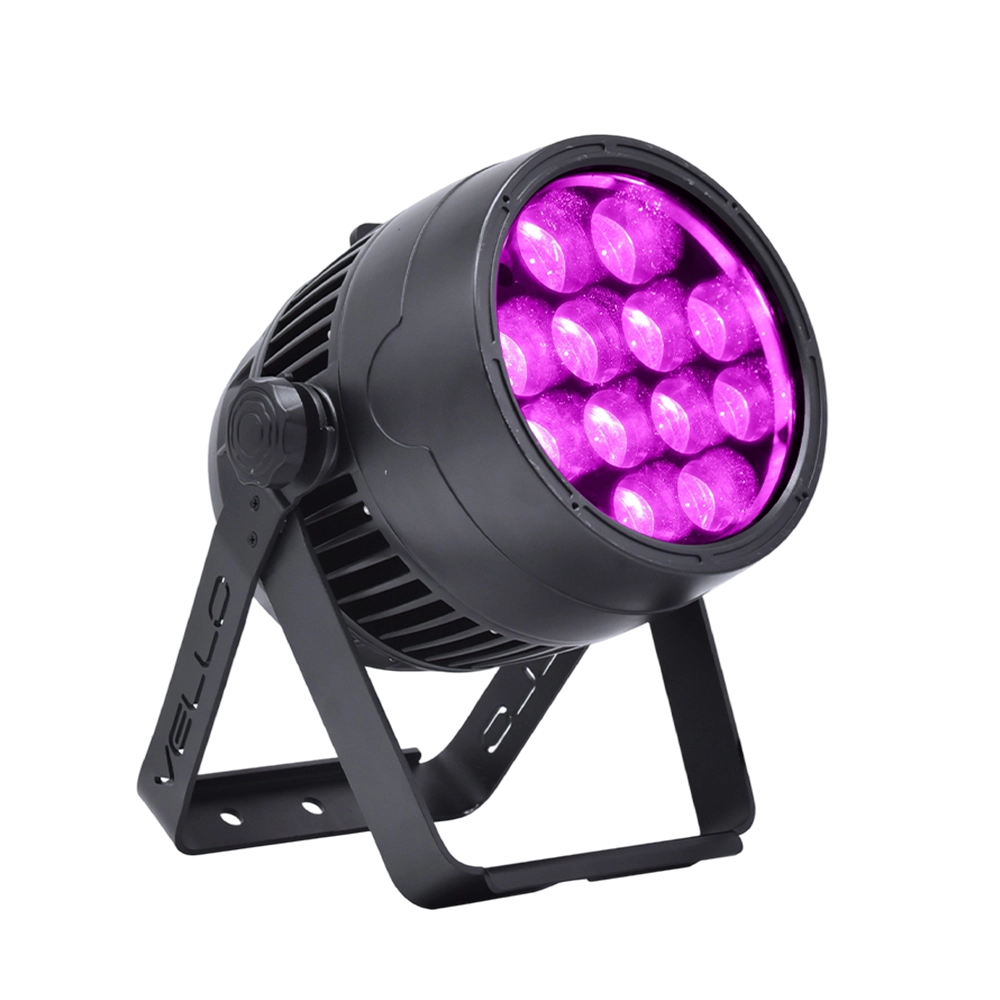
Stage LED Par Light LED ZOOMPAR 40
The Vello Zoom Par 40 IP is a powerful outdoor LED wash light equipped with 12x high-power 7-in-1 RGBACL LEDs. Designed for durability and rich color rendering, it features a wide motorized zoom (6°–50°), smooth dimming, and adjustable CTO presets (3200K–7500K), with 90+ CRI. With an IP66-rated die-cast aluminum body, it’s ideal for both indoor and outdoor applications, including stage lighting, architecture, live events, and installations.
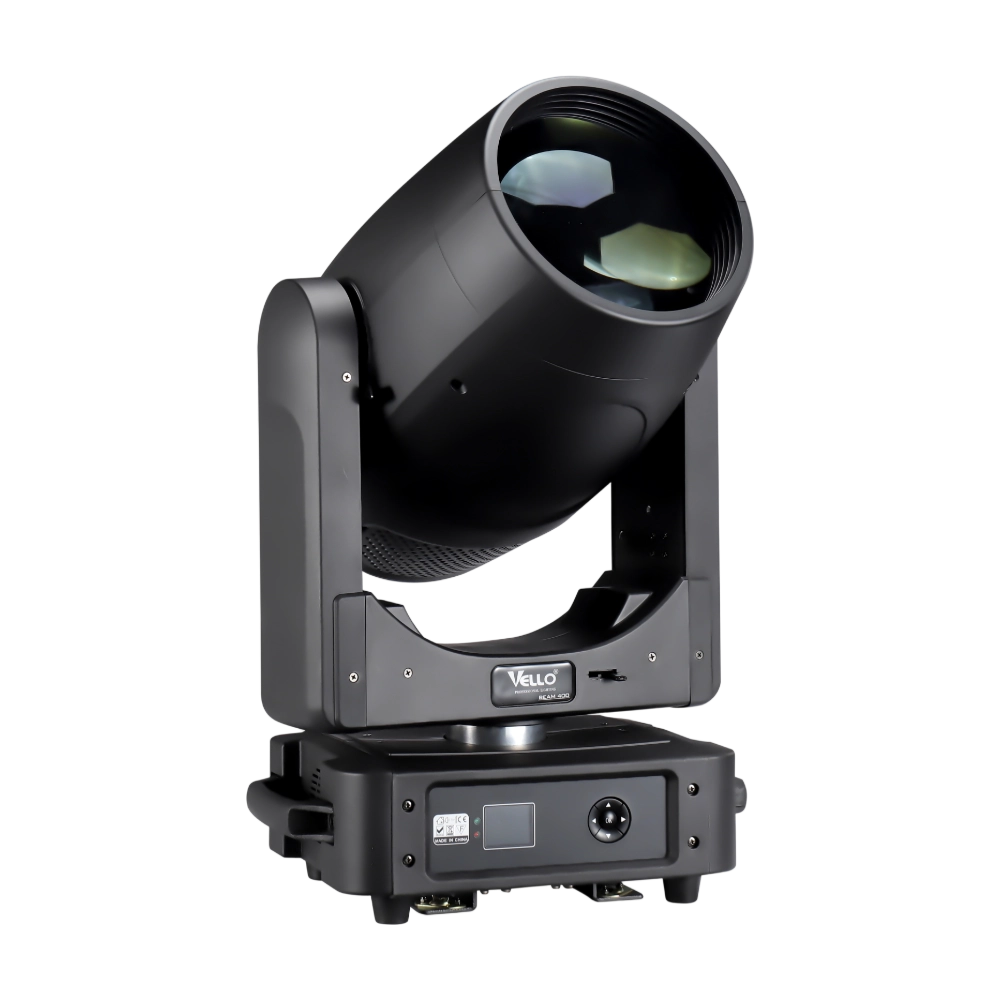
Moving Head Stage Light BEAM 400
BEAM400 is a 500W professional moving head beam powered by an OSRAM SIRIUS 371W discharge bulb, delivering a super-bright 1.8° sharp beam with impressive punch. It features 12 fixed gobos + open, a 14-color wheel, and a 16-facet circular rotating prism with multiple-facet effects, enabling dynamic aerial visuals. With 540° pan / 270° tilt, 16-bit movement resolution, and linear frost and focus, BEAM400 ensures precise and versatile performance. Comparable to traditional 750W moving heads, it combines high efficiency, smooth dimming, and reliable operation—ideal for concerts, tours, and large-scale stage productions.
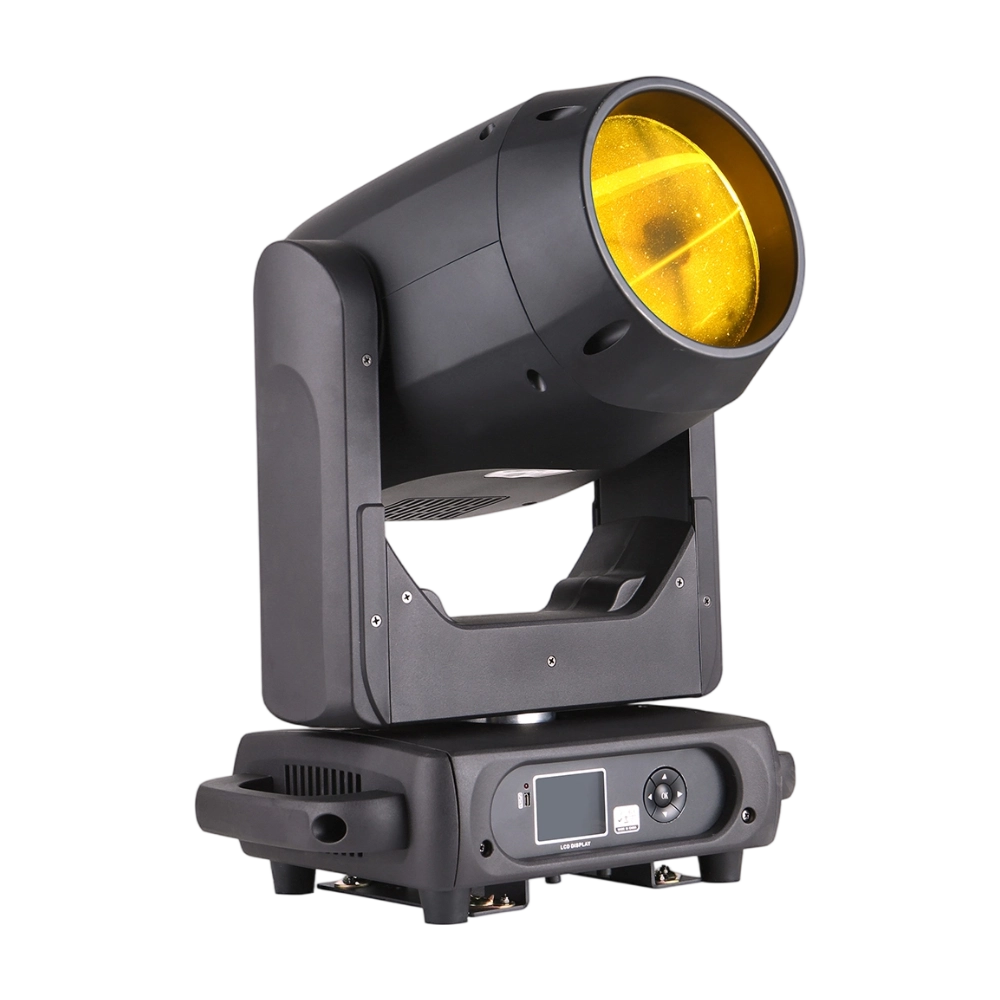
Moving Head Stage Light BEAM 360
BEAM360 is a 400W high-power moving head beam equipped with an OSRAM SIRIUS 311W discharge lamp, delivering a sharp 1.8° beam with super brightness. It features 14 colors + open, 12 fixed metal gobos + open, and dual prisms (8-facet circular + 8+16 multi-facet combination) for dynamic aerial effects. With 540° pan / 270° tilt, 16-bit movement, and linear frost and focus, BEAM360 ensures precision and versatility. Compact yet powerful, it rivals traditional 575W moving heads, making it ideal for concerts, clubs, and large-scale stage productions.
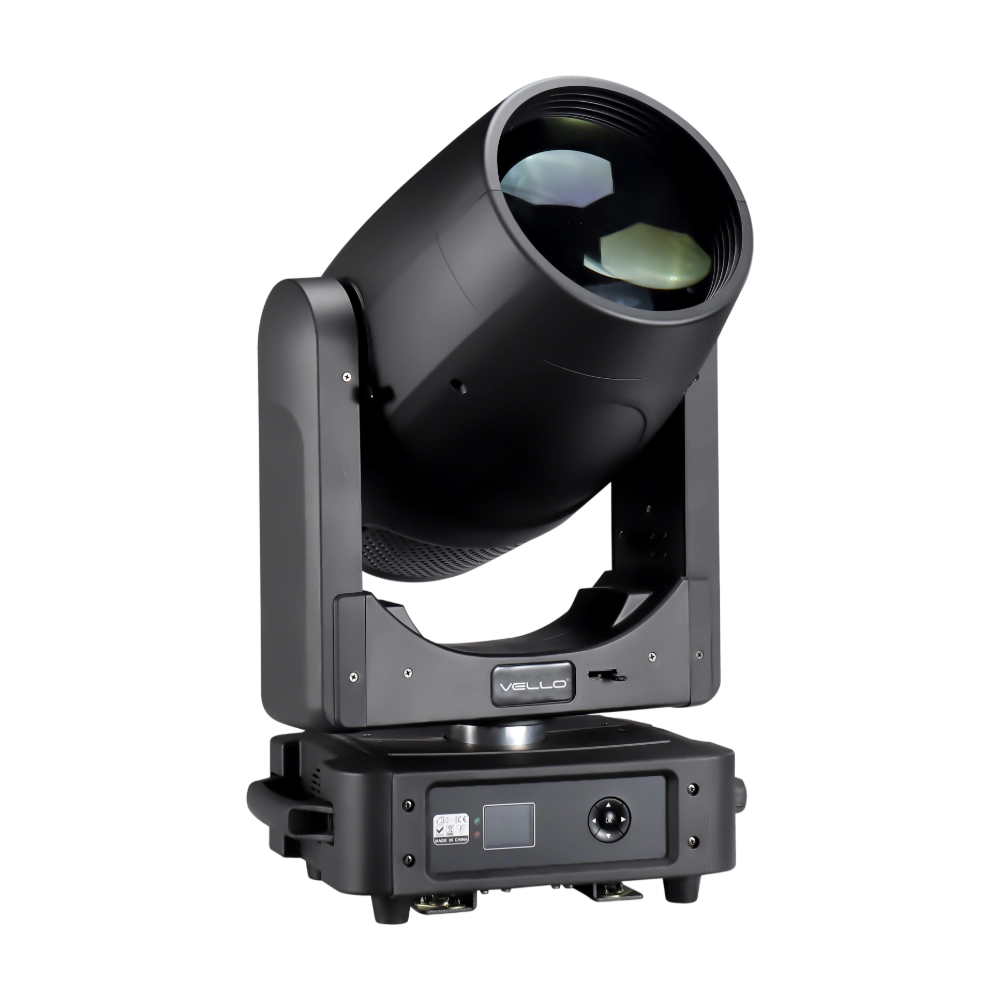
Moving Head Light BEAM 450
The BSW450 is a high-performance moving head fixture equipped with an original Osram 420W bulb, delivering exceptional brightness, precision, and versatility. Designed for professional stage applications, it seamlessly combines beam, spot, and wash functions in one compact unit, making it a powerful all-in-one lighting solution.
Over 20 Years of Innovation in Stage & Studio Lighting
© 2026 VELLO. All Rights Reserved. 粤ICP备20023734号
Join our socials
VELLO
Whatsapp: +8613902276704
Vello Lighting
VelloLights